Our preferred eddress for short messages and timely responses
|
Top Level Crew Level Jon's Pages |
Radio Email
We are able to receive email for free via the Ham radio right on the boat. This wonderful service has helped keep us sane when we get homesick for our dear friends. In fact, since checking our HackingFamily.com email accounts often requires bundling up a laptop computer in a waterproof case and schlepping it ashore via dinghy and taxi to a cyber-cafe, we only check those accounts now and then, sometimes with lapses of over a month. We check our Ham based email almost every night, and it has become our primary email address, especially for short, time-critical correspondence.
|
Our preferred eddress for short messages and timely responses |
I don't want to put an email link here, because web robots look for them to send spam, but if you want to email us on Ocelot, send it to Jon's call sign (at) Winlink.org. However, we depend on this email to get vital weather information, so the spam-filter is pretty tight. Please remember to send your message in plain text only, and please keep it to the point (a page or 2 if possible). We can now receive small attachments, but please ask first and tell us how big it is.
Important Note: Due to increasing spam and recent changes to the Winlink system, you must now include the 6 characters //WL2K at the end of the Subject: line. Otherwise, your email will be bounced and we will not be notified. You will have to resend the email. Once we email you, your eddress will be in our white-list and you will no longer need the //WL2K.
Ham stands for High-frequency AMateur, and Hams have been pioneering advances in radio for something like 100 years. Hams are an amazing group. Even in the 1980s, there were hundreds of Hams worldwide who would spend hours of their time and thousands of their dollars on radio equipment so they could connect us "Maritime Mobiles" to the US phone lines so we could call home. They also provided this service for military personnel deployed overseas. Hams are still providing this wonderful service today (along with several others) and we've used it, especially when we're expecting visitors.
Now a group of Hams have added frequency scanners, computers, and Internet connections to their radios, and formed themselves into a worldwide network (Winlink.org and the Amateur Radio Safety Foundation) with the main purpose being to provide email to folks like us who would otherwise have difficulty getting it. What a wonderful boon to the cruising community! Like virtually all Ham services, the Winlink email service is provided free of charge to anyone with a valid Ham license and the appropriate hardware (see below). If you don't have a valid Ham license, there are non-profit commercial companies like SailMail that use Marine Single Side-Band (SSB) frequencies to do the same thing, and they charge about $300/year.
Let me back up for a second here to explain some terms.
 |
High-frequency (HF), in this case, is an outmoded term. 50 years ago, anything from the top of the AM broadcast band (say, 1.5 MHz - mega-hertz, or millions of cycles per second) to about 30 MHz was termed "high" frequency. Today, these are pretty low frequencies - for example, FM radio is about 100 MHz and your cell phone might use GHz (gigahertz, or billions of cycles per second) frequencies - but the HF moniker has stuck. We tend to use frequencies in the 7,10, or 14 MHz bands for contacting our "local" ground stations, which are usually thousands of miles away. |
|
Single Side-Band (SSB) refers to a method of modulation, like AM (Amplitude Modulation) or FM (Frequency Modulation). An AM radio station actually broadcasts a carrier wave (which carries no real information except to say "here I am") as well as redundant sound information (music or speech) on its 2 "sidebands", one on each side of the carrier frequency. This is fine if you're a commercial broadcast station with 50,000 watts of power, but we only have 100 watts. SSB suppresses the carrier and one of the redundant sidebands, and puts all of our power into the other (single) sideband. This allows us to transmit much further (thousands of miles) on much less power, with the downside that if both stations are not on exactly the same frequency, we sound like Donald Duck (because there is no carrier signal for the radio to lock on to). |
|
Both Ham and Marine SSB radios use the same 2‑30MHz spectrum, but they use different frequency bands within that spectrum. Either type of radio will usually receive throughout the entire spectrum, but by default they will only transmit on the Ham or Marine bands, as appropriate. Marine SSB radios are usually designed for use by non-radio folks, so they're relatively simple to operate but somewhat limited in what they can do. Ham radios expect the user to know a considerable amount about radio use, and offer more sophisticated displays, controls and filters. Ham radios are often run from batteries so they usually draw less power, while Marine SSB radios are more interested in getting the frequency exactly right so they often put their primary oscillator in a small power-hungry oven. Marine bands always use the upper sideband, while Ham nets conventionally use the lower sideband below 10MHz. OK, enough school - my giga-hurts. |
The Winlink system is based around a network of several dozen "ground stations". These ground stations are completely automated computer / radio / scanner setups and each one is allocated several frequencies. Ground stations typically only have 1 or (rarely) 2 transceivers (radios), and if they're busy on one frequency then they can't answer you on another. These automated ground stations are connected over the Internet, talking to the centralized Winlink email servers.
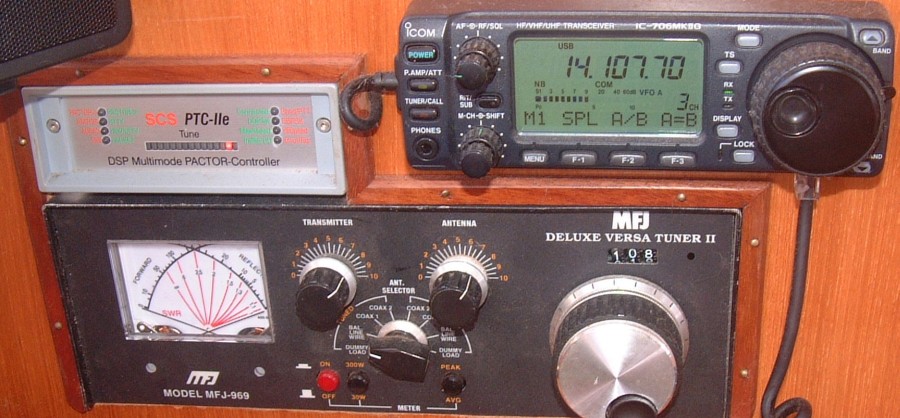 Pactor 3 Modem on left, SSB Radio on right, and Antenna Tuner underneath |
To use SSB based radio email, you need:
|
An SSB radio transceiver - ours is a modified Icom 706 Mk II/g that can operate at virtually any frequency up to about 500 MHz (in the upper right of the photo). |
|
Some sort of Antenna system. Ours is a bit of copper wire run from our hull up to our uppermost spreader. To make this wire resonate at the frequency we want to use, we use an antenna tuner. Although automatic antenna tuners are available, they're not as reliable. When they break, you can't use your radio, so we use a manual tuner (the big black box at the bottom of the photo). This is slower to tune, but it's very reliable and it often gets a better tune than the automatic tuners. Ours has a nice roller inductor (right) and a cross-needle SWR meter (left). |
|
A specialized modem to go between the radio and the computer - we use an upgraded SCS PTC-IIe (in the upper left of the photo). This little box costs about $700 (yikes!) Cheaper radio modems are available, but SCS is the only one that can use the Pactor 2 protocol which is 5 times faster than Pactor 1. We also got the $150 software upgrade to Pactor 3, which is up to four times faster than Pactor 2. There is now a slower protocol that uses just your sound card, so it's much cheaper but it's not as widely used - see Winlink.org for details. |
|
A computer to run the AirMail client (the software is free off the web). |
|
A valid General class (or better) Ham license if you want to use the free Ham based Winlink system. In the US this involved taking 2 written tests, which your local Ham club will gladly help you pass (the 5 words/minute Morse code test has now been eliminated, making it much easier to get your Ham license). |
In the picture above, you can see our radio in the upper right, with the modem on the left, and the antenna tuner is the big box underneath. These are all mounted in the side of our Navigation Desk, under the Electronics console. We sit the computer on the Nav Desk to send or receive email.
Just before we left the states, we all worked hard to get our Ham licenses (ever had beeps and boops go through your dreams?) We all succeeded to varying degrees, and both Jon (KD7NDG) and Chris (KD7NDF) got their general class licenses. Sue and Amanda are KD7NOT and KD7NOU, respectively. So we can use the free Winlink system, which also has many more ground stations, and lots of impetus and time to improve the system. The main caveat is that we're not supposed to use the Ham radio for any 'business' purposes. That's why it's called Amateur Radio.
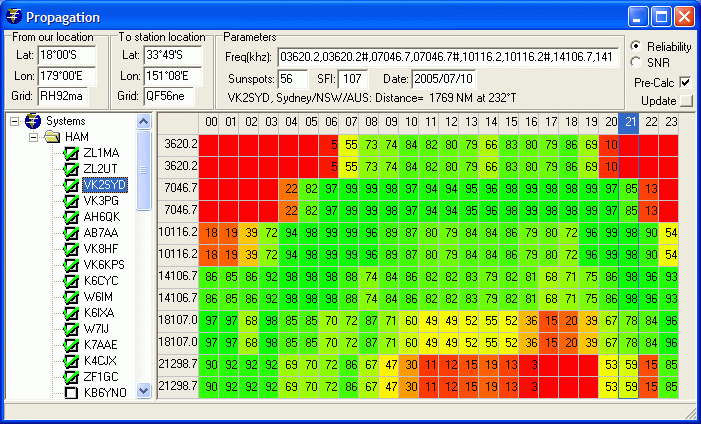 The Propagation window (click on image for full size version) |
From our perspective, we first have to contact one of these ground stations. We check the cool radio propagation prediction program (what a mouthful) that comes with the AirMail client, to see which stations will work the best for us. This program takes into account the time of day, sunspot effects, direction and distance from us to the ground station, to show which frequency of a given ground station is likely to work best.
Unfortunately, this program doesn't take into account some of the specialized 'beam' antennas that some stations use. These beams focus the radio energy, both transmit and receive, in one direction, rather than radiating it in all directions. For instance, we often contacted K7AAE (All American Eagle, as he liked to call himself) in Woodinville (near Seattle, over 4,000 miles from French Polynesia) rather than the closer stations in Hawaii (only 2,350 miles away) as K7AAE's beam gave him a better signal, even though he was 1,700 miles further away. (Sadly, All American Eagle died a few years ago - became a "silent key" - but we really appreciate his efforts and his station.)
So, having written the emails that we want to send, we fire up the radio,
dial it to the selected band (we usually use 7, 10, or 14 MHz), tune up
the antenna, and then set it to one of the frequencies of the ground station we
want to contact (remember, each ground station monitors several frequencies). We
connect the modem to the computer via a serial line, fire up the AirMail program, and
if the frequency is clear we tell it to
connect. This keys our transmitter in a pattern the ground station is looking
for, and the rest is all automatic. Our computer and the ground station
even track their frequency drift and negotiate a faster or slower connection as
propagation conditions change. The computers chat away for a few seconds (just to be
sociable  ) and then our
first 5 outgoing emails are sent, followed by up to 5 incoming emails.
This repeats until all emails have been sent and received. Then the computers
automatically disconnect so others can use the service.
) and then our
first 5 outgoing emails are sent, followed by up to 5 incoming emails.
This repeats until all emails have been sent and received. Then the computers
automatically disconnect so others can use the service.
If we're underway or in a new anchorage, we will also send in a position report. Airmail will do this automatically if we want. The position report goes to both Winlink and to Ship Track and their computers use it to generate a Google Map of our location. This is the map that we link to at the bottom of our Home Page. The map is updated as soon as we send our position report, so usually twice a day when we're on passage. Pretty cool!
Frequently Asked Questions (which will probably only generate more questions):
|
Can we use the system to access the Internet? No, we can't get on the Internet (dang!). Speeds are really way too slow anyway. But what we can do is ask to have a specific web page sent to us as email, which is sometimes handy if we know the exact URL. |
|
How fast is the connection? Very slow. Excruciatingly, painfully, glacially slow by modern standards. That is why email is sent as plain text only, with no attachments. We seem to average about 1 KByte/minute upload and perhaps 2 KB/min download. Actual throughput is perhaps 50% better than that as everything is compressed and decompressed on the fly. Still, that is something like 300 baud, or less than 1% as fast as the 56K baud that most modems today are capable of, and a tiny fraction of the speed of ADSL or a cable modem. Talk about connecting using stone knives and bearskins, but remember that it works virtually anywhere in the world... |
|
Are we limited by how much we can use the system? Yes. We are nominally limited to 30 minutes a day per station but we're rarely on for even 10 minutes unless radio propagation is very poor or we are receiving a very large message. There is no cost to us for using the system. |
|
Do we have to use the radio? No we don't. If we're connected to the Internet already (via our 3G modem or at a cyber-cafe) then we can use that internet connection to send and receive our Winlink emails. |
|
Who is our Internet Service Provider? We don't really have an ISP because we have no real contact with the internet except email. The central Winlink computers collect emails from the Internet and distribute them to the other Winlink servers, which are distributed around the world (San Diego, Halifax, Perth, Wien, etc). All Winlink stations around the world now have high-speed internet connections, and can be in instant contact with one of the central Winlink servers. |
|
What ground stations do we use? We use several different Ham ground stations depending on where we are. In the Caribbean we used one on Grand Cayman Island and one in Tennessee the most, but a Halifax station with a beam antenna was also very good. In French Polynesia we typically used one of the 5 stations on the US west coast with beam antennas: San Diego, LA, or Seattle (3,500 to 4,200 miles away) but we've also connected to Hawaii, New Zealand and Australia. In Indonesia we usually went through stations in Perth or Manila. In the central Indian Ocean we used Chennai (Madras), India. |
|
Who pays for all this? (tanstaafl *) The whole operation is run by volunteers at Winlink.org. and the Amateur Radio Safety Foundation. There are a few developers writing and maintaining the software and a system administrator to keep the whole thing going. Many Hams are retired, and Hams are typically very giving of their time and energy. Ground stations have to pay for their radios, computers, antennas, and Internet connections out of their own pockets. But it's a wonderful service they provide to us cruisers. |
|
Are they looking for more volunteers? Indeed they are. The system is growing quickly in terms of users, services, complexity, and sophistication. If you're a .NET programmer who would like to contribute to an excellent cause, I can put you in contact with the lead developer. |
|
What email client do we use? We use a freeware mail program called AirMail , written specifically for Winlink and SailMail, to drive the modem and to manage our mail. It also has an excellent viewer for our GRIB weather files. You can download a copy and poke around if you wish. The front end is not as slick as Outlook or even Outlook Express, but it's not bad and it has an excellent spell checker (thank goodness). The back end -- error detection and correction, connection speed negotiation and manipulation (which is constantly changing), and driving the modem -- seem to be pretty good. |
|
Can the system handle attachments? Yes, but with limitations. We can send and receive small attachments, but they must be small (absolute maximum is 40KB, but smaller is better). This is because large attachments would chew up too much time, and the airwaves are a shared resource. Others want to get their email as well. Unfortunately, you, the sender, are not notified if your attachment gets stripped off by the Winlink servers for being too big. |
|
Why is sending plain text better? HTML mail, common on Hotmail, Gmail, Yahoo, etc, takes more time to transmit than plain text, because of the HTML formatting tags. Therefore, the Winlink email servers convert all HTML mail to plain text. In the process, all formatting is lost, especially paragraph breaks. This makes the mail arriving on our end look "squashed" as it's all in one big, lumped paragraph. If possible, please send us email in plain text format only, as it's much easier for us to read. |
|
What frequency bands do we use? We aren't restricted on what Ham bands we can use except that we need to connect to a ground station. Each ground station typically monitors several different bands. We tend to use either 10 or 14 MHz so we don't have to re-tune the antenna too much, but we also use the 3, 7, 18, and even 21 MHz bands when we need to connect to a more distant ground station. |
|
How good is the coverage? Is it worldwide? How far away does it work? From the Eastern Caribbean, Grand Cayman was 1,200 miles away, Florida was 1,400, Halifax was 1,850, and we used all 3 regularly. I'm really not sure of our ultimate range but we'd probably struggle at 5,000 miles. Airmail comes with a cool propagation program and sunspot numbers are automagically downloaded to it every time we connect to a ground station. I haven't plotted all of the stations around the world, but the biggest hole seems to be South America. The South Atlantic is only covered by Pretoria, which is a problem when you're in Brazil or Argentina. The South Pacific isn't well covered (2 stations in Hawaii, 2 in New Zealand, 1 in Sydney, and 5 beams on the US west coast) and the Indian Ocean is even worse (only Perth, Manila, Madras, Pretoria, and Durban) but I still think the system is essentially world wide. There are currently about 30 ground stations outside the continental US in places like Zagreb, Rudolstadt, Toulouse, Chennai, Auckland, and they're actively recruiting more. |
|
What did it all cost us? Like most things, there is a trade-off between performance and price. Our radio modem cost $700 - the $1,000 model would also change radio channels (frequencies) for us, but we didn't think we needed that, while the $200 Pactor 1 modems are just too slow. We also bought the $150 upgrade to Pactor 3 for faster connections. Our Icom radio was about $700, but cheaper (and more expensive) models are available. I picked up our manual antenna tuner at a swap meet for $100. Our newer automatic antenna tuner cost $400 but isn't really necessary (it's just easier for the non-geeks on board). Our antennas are just bits of wire going up to our upper spreaders. We also installed 2 grounding plates under the antenna tuners. The computers came from an on-line auction house for $500-$1,000, but I don't really count them as we need them for navigation anyway. The AirMail software is free off the web and the Winlink service is also free. Call it $1,600 plus the computers. But, of course, we use the radio for other things, like talking to friends, and the modem also allows us to easily receive weather maps and pictures. |
|
Where can you find out more about this? Winlink is on line at http://winlink.org. The Amateur Radio Safety Foundation is at http://arsfi.org The Airmail client is available for free at http://www.airmail2000.com. Stuff on the our modem and the Pactor protocol can be found at: http://www.scs-ptc.com |
* tanstaafl -
There Ain't No Such Thing As A
Free Lunch. If you didn't know that already, you need to
read more science fiction!
Jon's Pages:
Top Level: Home | Destinations | Cruising Info | Underwater | Boat Guests | Ocelot | Sue | Jon | Amanda | Chris | Site Map | Make a Comment
|
If our information is useful, you can help by making a donation |
Copyright © 2000‑ Contact: Jon and Sue Hacking -- HackingFamily.com, svOcelot.com. All rights reserved.